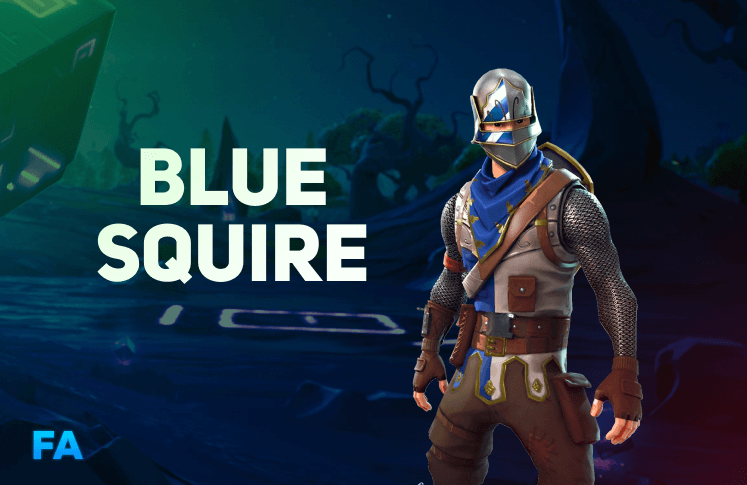
Fortnite Blue Squire Account for Sale

Blue Squire + Rare Skins

Legendary
Blue Squire + Rare Skins

Description

Fortnite Account With Blue Squire + Random Rare and OG Skins, Pickaxes, Emotes.

High Chance to Get: Black Knight, OG Skull Trooper, OG Ghoul Trooper, Aerial Assualt Trooper…
OG Skins: High chance to receive OG skins from old seasons!
OG Pickaxes & Emotes: Get OG and rare emotes and pickaxes!

Compatible with All Platforms:
PC | PlayStation | Xbox | Nintendo Switch

Fast Delivery & Safe Process
You will receive Login and E-mail info (Full Access)

Seller Reviews

5.0
5 reviews
5★
100%
4★
0%
3★
0%
2★
0%
1★
0%
J
Justin ✔ Verified 3 weeks ago

Good acc

J
James ✔ Verified 1 month ago

Delivery was instant and the account is legit. Blue Squire was there and some nice rare extras too

J
Jaceon ✔ Verified 2 months ago

Instant and legit

Join our Discord community

Hang Out with the Community & Get Extra Rewards

Our entire support team lives in Discord. Join the server to get fast help with your Fortnite account, grab exclusive bonuses, take part in giveaways and stay updated on new OG stock drops.

Members
1,000+ players
FN community only
Support
Live Discord chat
Avg reply < 2 minutes
Perks
Bonuses & drops
Promo codes & giveaways
  • Weekly Discord-only promo codes and early access to new OG accounts.
  • Regular giveaways for V-Bucks, discounts and free upgrades.
  • Direct line to our support team for any questions about your purchase.
Join Discord Server

Free to join • No purchase required • FN players only

Right now in Discord

120+ members online

Live Support Channel

Ask about purchases, payments or accounts — staff answers in minutes.

Giveaways & Events

Weekly draws for discounts, V-Bucks and account upgrades.

Stock Alerts

Be first to know when rare OG skins drop back in stock.

Verified server • FN only Free to join

You may also like

In this article
  1. About This Fortnite Blue Squire Account
  2. Fortnite Blue Squire at a Glance
  3. What Is Included in This Account
  4. Who Is the Fortnite Blue Squire Account For?
  5. Why Buy the Fortnite Blue Squire Account Here
  6. Fortnite Blue Squire: Price and Value
  7. How to Buy Fortnite Blue Squire Step by Step
  8. Payment Methods and Checkout Security
  9. How to Check the Account After Delivery
  10. Your First 24 Hours With the Fortnite Blue Squire Account
  11. Platforms and Playing on Console or PC
  12. Fortnite Blue Squire Compared With Other Options
  13. Tips Before You Buy the Fortnite Blue Squire Account
  14. Customer Support for Fortnite Blue Squire Buyers
  15. Delivery, Full Access and Warranty
  16. Buyer Protection and Refunds Explained
  17. Is It Safe to Buy This Account?
  18. What Buyers Value in This Kind of Account
  19. Keeping the Account Safe in the Long Term
  20. Common Mistakes With the Fortnite Blue Squire Account
  21. Frequently Asked Questions
  22. Related Pages

Fortnite Blue Squire account is a guaranteed named skin account that is delivered automatically after payment, with full access to the login and the linked e-mail. This guide explains what the listing contains, how delivery works, how to check and secure the account and what the warranty covers, so you can decide before you pay.

Fortnite Blue Squire

About This Fortnite Blue Squire Account

Fortnite Blue Squire is a guaranteed named skin account. After checkout the system delivers the login and e-mail details instantly, so the account is yours to secure within minutes.

This listing is part of our Guaranteed Skin Account range. Browse all Blue Squire accounts to compare it with similar options.

The headline of this listing is the Blue Squire outfit. It is the one item we guarantee, and everything else in the locker is a bonus that varies from account to account.

Fortnite Blue Squire at a Glance

Detail Value
Account Fortnite Blue Squire
Type A guaranteed named skin account
Current price $24.99
Buyer rating 5.0 out of 5 from 5 reviews
Access Full access: login and e-mail
Delivery Instant and automatic
Warranty 7 days with Buyer Protection
Platforms PC, PlayStation, Xbox and Nintendo Switch

What Is Included in This Account

The Blue Squire outfit is guaranteed in the locker when the Fortnite Blue Squire account is delivered. On top of it the account includes random rare and OG skins, pickaxes and emotes, so you receive more than a single item.

The product description names these items as a high chance, which is a chance and not a guarantee:

  • Black Knight
  • OG Skull Trooper
  • OG Ghoul Trooper
  • Aerial Assualt Trooper

Every account is delivered with full access. That means the Epic Games login, the e-mail address linked to it and the right to change both, so you become the only owner of the account as soon as you secure it.

Who Is the Fortnite Blue Squire Account For?

  • Collectors who want a named outfit in the locker without guessing.
  • Returning players who want a standout look straight away.
  • Budget-minded buyers who prefer one certain item to a random pack.

Why Buy the Fortnite Blue Squire Account Here

Most Fortnite account listings leave you with questions: will the login work, who really owns the e-mail and what happens if something goes wrong. We answer these before you pay. The Fortnite Blue Squire account is delivered automatically, with full access, and every order is backed by Buyer Protection and a 7-day warranty.

You do not need to negotiate with a private seller or wait for someone to come online. The store delivers the details the moment the payment is confirmed, and the details land both in your inbox and in your account dashboard, so you cannot lose them.

The listing text is written to be checked. It says what is guaranteed, what is random and what is only a chance, and you can compare that with the locker after delivery. If the account does not match its description, support will review your order with you instead of leaving you alone with the problem.

Fortnite Blue Squire: Price and Value

The current price of the Fortnite Blue Squire account is $24.99, and the live price is always shown at the top of this page. Named items are priced by how rare they are and how much demand they have, so a price difference between two skin accounts usually reflects the rarity of the headline item, not the number of random extras.

When you compare prices, compare what is guaranteed, not only the number on the price tag. A cheaper listing that gives no full access, no warranty and no support is not really cheaper, because the cost of a problem lands on you. With this listing you get full access, automatic delivery, a 7-day warranty and 24/7 help in the same price.

If you are still deciding, open all Blue Squire accounts or read our skin prices guide to see how rarity affects value across the catalog.

How to Buy Fortnite Blue Squire Step by Step

Checkout is short, and you can finish it without talking to anyone.

  1. Read the description and the table above to confirm that this is the account you want.
  2. Add the Fortnite Blue Squire account to your cart and open the checkout.
  3. Enter your e-mail address. The delivery details are sent there, so double-check it.
  4. Pay with a card, Apple Pay, Google Pay or crypto.
  5. Receive the login and the linked e-mail details automatically, by e-mail and in your account dashboard.
  6. Follow the check and security steps below, then log in to Fortnite.

Keep the order e-mail until you have secured the account. If you are unsure about any step, support answers on Discord and by e-mail around the clock.

Payment Methods and Checkout Security

You can pay for the Fortnite Blue Squire account by card (Visa, Mastercard, American Express), by Apple Pay or Google Pay, or with cryptocurrency. Card and wallet payments are handled by the payment provider, so the store never sees your full card number. Crypto payments are confirmed on the network and delivered as soon as the transaction is accepted.

Pay only inside the store checkout. Do not send money to a private chat, a wallet address given in a message or any link that did not come from this site. Payments made outside the store are not covered by Buyer Protection, and nobody on our team will ever ask you to pay anywhere else.

After payment you receive an order confirmation. Keep it, because the order number is the fastest way for support to find your purchase if you ever need help.

How to Check the Account After Delivery

  1. Log in to the Epic Games account with the delivered login.
  2. Open the Locker and search for Blue Squire.
  3. Compare what you see with the product description.
  4. Change the password and the e-mail address to details only you control.
  5. Turn on two-factor authentication.
  6. If anything differs from the description, contact support with your order number.

Do these steps in one sitting, soon after delivery. The warranty is easier to use when the problem is reported quickly and the order details are fresh.

Your First 24 Hours With the Fortnite Blue Squire Account

The first day matters more than any other, because this is when you turn a delivered login into an account that belongs only to you. A simple order works best.

  • First hour: log in, find the Blue Squire outfit, then change the password and the e-mail address.
  • Same day: enable two-factor authentication, save the recovery options somewhere safe and look through the locker to see the random extras that came with the account.
  • Next day: play a few matches, confirm that everything works on your platform and keep the order e-mail in case you need support.

Avoid logging in on many devices at once and do not install tools from unknown sources on the machine you use for the account. Small habits like these protect the account far better than any single setting.

Platforms and Playing on Console or PC

The Fortnite Blue Squire account is an Epic Games account, and the cosmetics belong to that account, not to a single device. You can play on PC, PlayStation, Xbox and Nintendo Switch, as long as you log in with the delivered Epic Games details on your platform.

Before you link a console account to a new Epic Games account, read Epic’s current rules on platform linking, because a platform account that has already been linked to another Epic Games account may need to stay with that account. If you are not sure, contact support first and describe your platform. It takes a minute and avoids a problem that is difficult to undo later.

On PC you simply log in through the Epic Games launcher. On console, most buyers log in through the Epic Games sign-in screen inside Fortnite and keep their own console profile as it is.

Fortnite Blue Squire Compared With Other Options

There are three common ways to get a locker like this: unlock the items yourself over many seasons, buy a random pack or buy a listing built around a named item. Each has a place, and the right choice depends on what you want.

  • Earning it yourself gives you the full story of the account, but many classic items can no longer be unlocked at all, and time-limited ones need a lot of play.
  • A random pack is cheap per item and fun to open, but you cannot choose what is inside.
  • A named-item listing such as this one guarantees the item you came for and adds random extras on top.

If you are unsure, start with the listing that matches your main goal. You can always add another account later and compare, and all Blue Squire accounts lets you see the other options next to this one.

Tips Before You Buy the Fortnite Blue Squire Account

A few minutes of preparation make the purchase smoother and the first login safer. These are the things experienced buyers do before they pay.

  • Use an e-mail address you can open right now, because the delivery details are sent there.
  • Decide where you will store the new password. A password manager is the easiest option and removes the temptation to reuse an old password.
  • Read the product description to the end, including the lines that explain what is guaranteed and what is only a chance.
  • Have a second device or an authenticator app ready for two-factor authentication.
  • Make a note of your platform, so you can tell support exactly what you use if you have a question about linking.

None of this takes long, and together it turns the purchase into a routine you can finish in a few minutes after delivery.

Customer Support for Fortnite Blue Squire Buyers

Support is part of what you pay for. The team is available around the clock on Discord and by e-mail, and the Help Center collects the answers to the most common questions about delivery, access and the warranty.

When you write, include your order number, the e-mail you used at checkout and a short description of the problem. If the question is about the contents of the account, add a screenshot of the locker. With these details the team can answer in one message instead of several, and the answer is usually faster.

Delivery, Full Access and Warranty

Delivery is automatic and instant. The login and e-mail details arrive in your inbox and in your account dashboard. Every order is covered by the Buyer Protection and a 7-day warranty, and the refund policy explains exactly what is covered. If you need help, the Help Center is open 24/7.

The warranty covers what it should: credentials that do not work, access that is missing from the delivery and an account that does not match its description. It does not cover changes you make yourself after delivery, so it is worth running the check steps first and reporting any difference right away.

Buyer Protection and Refunds Explained

Buyer Protection is the reason to buy from a store and not from a stranger. It means that a real team reviews your order if something is wrong, that the terms are written down and that you have a place to send your order number.

In practice, the process is short. You write to support with your order number and a clear description of the difference between the listing and what you received. Screenshots help. The team checks the order and tells you the options available under the refund policy. The sooner you write, the easier it is to verify.

Please read the refund policy before you pay. It is short, and it answers most of the questions buyers ask after purchase.

Is It Safe to Buy This Account?

No honest seller can promise a purchase is risk-free. Epic Games has terms about accounts, and scams exist across the market. We reduce the risk with full access, automatic delivery, a warranty and support, and you reduce it further by securing the account immediately. Read Epic’s Terms of Service and our safe buying guide before you decide.

What Buyers Value in This Kind of Account

Buyers of this type of account usually mention three things: how quickly it arrives, whether the contents match the description and whether support helps when something is unclear. We build the listing around those three points so you know what to expect before you pay.

Read the reviews on the page, compare the price with similar listings and open all Blue Squire accounts if you want to see the alternatives side by side.

Keeping the Account Safe in the Long Term

Securing the account on day one is only the start. Keep the password unique, keep two-factor authentication on, review the connected platform accounts from time to time and ignore messages that ask for your login. Keep the order number in a safe place in case you ever need support.

Be careful with free skin generators, “account checkers” and any site that asks for your Epic Games login in exchange for items. They are one of the most common ways accounts are lost. Epic Games and this store will never ask you for your password in a message.

Common Mistakes With the Fortnite Blue Squire Account

  • Not checking that the named item is in the locker.
  • Skipping the security steps after delivery.
  • Not reading the warranty and refund policy.
  • Sharing the login or the order e-mail with other people.
  • Choosing only by price.
  • Paying outside the store checkout.

Frequently Asked Questions

Is full access included?

Yes. You receive the login and the e-mail linked to the account and can change both.

How fast is delivery?

Instant. The account is delivered automatically after payment.

Can I play Fortnite Blue Squire on console?

Yes. Cosmetics belong to the Epic Games account. Check Epic’s rules for linking platform accounts first.

Is Blue Squire guaranteed?

Yes. The named item is in the locker. The extra cosmetics are random.

What if the login does not work?

Contact support with your order number. The 7-day warranty covers non-working credentials.

Can I get a refund?

Refunds follow our published policy. If the account does not match its description, contact support.

Which payment methods can I use?

You can pay by card, Apple Pay, Google Pay or crypto inside the store checkout. Do not pay anywhere else.

Can I change the e-mail and password?

Yes. Full access includes the linked e-mail, so you can change both the e-mail and the password right after delivery.

Where do I find my order details?

The delivery details are sent to the e-mail you used at checkout and are also shown in your account dashboard.

Is buying a Fortnite account allowed?

Epic Games has its own terms about accounts. Read them, secure the account straight away and follow our safe buying guide.